Windows
Keyboard shortcuts
| Keys | Simple Description |
|---|---|
| Win + Ctrl + Right or Left arrow | Moving between virtual desktops |
| Win + Ctrl + D | Creating a new virtual desktop |
| Win + Ctrl + F4 | Closing the open virtual desktop |
| Win + Alt + D | Display and hide the date and time on the desktop |
| Win + A | Open Action center |
| Win + B | Set focus in the notification area |
| Win + E | Open File Explorer |
| Win + I | Open Settings |
| Win + P | Choose a presentation display mode |
| Win + S | Open search |
| Win + Shift + S | Take a screenshot of part of your screen |
| Win + T | Cycle through apps on the taskbar |
| Win + V | Open the clipboard |
| Win + Shift + V | Cycle through notifications |
| Win + ; or . (When inputting) | Open emoji panel |
| Win + , | Temporarily peek at the Desktop |
| Win + Pause | Display the System Properties dialog box |
| Win + M | Minimize all windows |
| Win + Shift + M | Restore minimized windows on the desktop |
Win + <number> | Open the desktop and start the app pinned to the taskbar in the position indicated by the number. If the app is already running, switch to that app. |
Win + Alt + <number> | Open the desktop and open the Jump List for the app pinned to the taskbar in the position indicated by the number. |
| Win + Tab | Open Task view |
| Win + Up arrow | Maximize the window. |
| Win + Right or Left arrow | Moving between virtual desktops |
| Win + Shift + Right or Left arrow | Move an app or window in the desktop from one monitor to another. |
Keyboard shortcuts - References
Voice typing
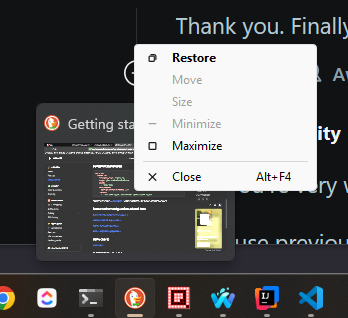
Open context menu of an open appliction from taskbar
Hover on to the preview and right click