References
Reference - SQL Language reference (opens in a new tab)
Reference - SQL Data types (opens in a new tab)
Reference - Databricks REST API (opens in a new tab)
Databricks Runtime release notes versions and compatibility (opens in a new tab)
Databricks Architecture (opens in a new tab)
Lakehouse Medallion Architecture (opens in a new tab)
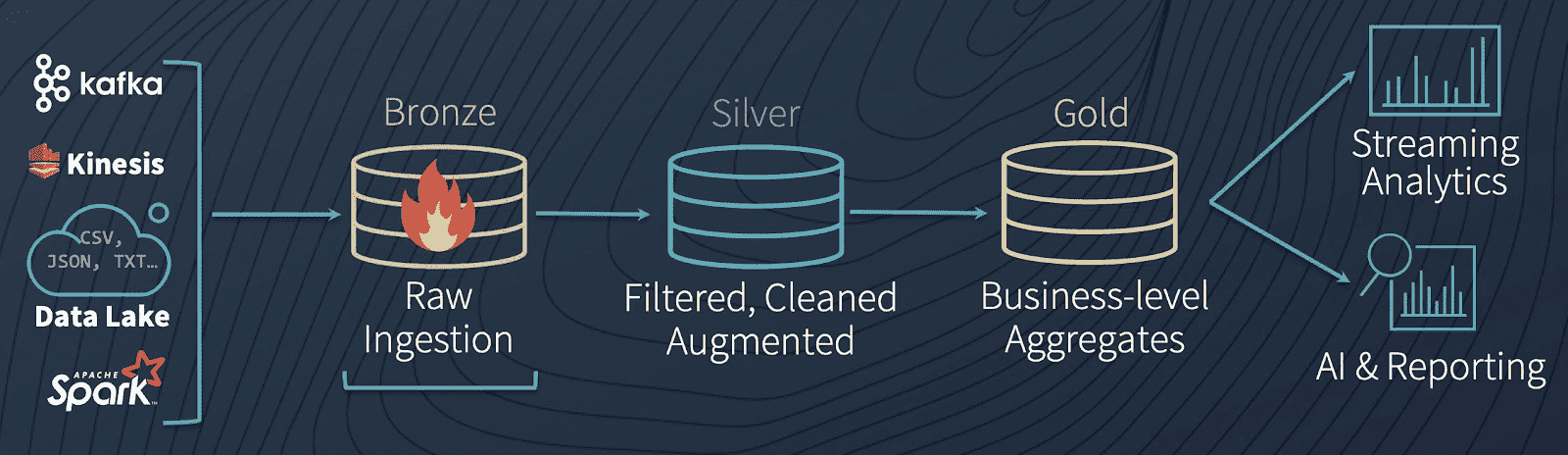
Bronze
- Ingests raw data in its original format
- No data cleanup or validation
- Is appended incrementally and grows over time.
- Serves as the single source of truth, preserving the data's fidelity.
- Enables reprocessing and auditing by retaining all historical data.
- Can be any combination of streaming and batch transactions from sources
- Metadata columns might be added
Silver
- Represents validated, cleaned, and enriched versions of the data.
- Data cleansing, deduplication, and normalization.
- Enhances data quality by correcting errors and inconsistencies.
- Structures data into a more consumable format for downstream processing.
- Start modeling data
Gold
- Business users oriented, aligns with business logic and requirements.
- Consists of
aggregated datatailored for analytics and reporting. - Optimized for performance in queries and dashboards
- Contains fewer datasets than
silverandbronze
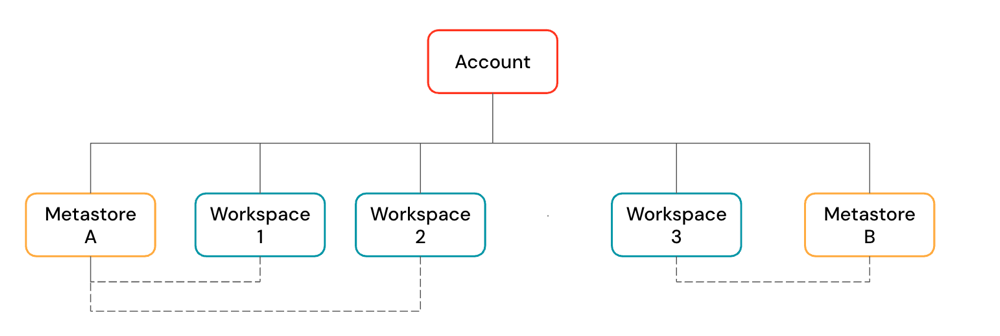
Databricks Account
Workspace
Databricks workspaceis a web application, functioning as the management console and cloud integrated development environment.One accountcan havemultiple workspaces in one region.
Workspace - Architecture (opens in a new tab)
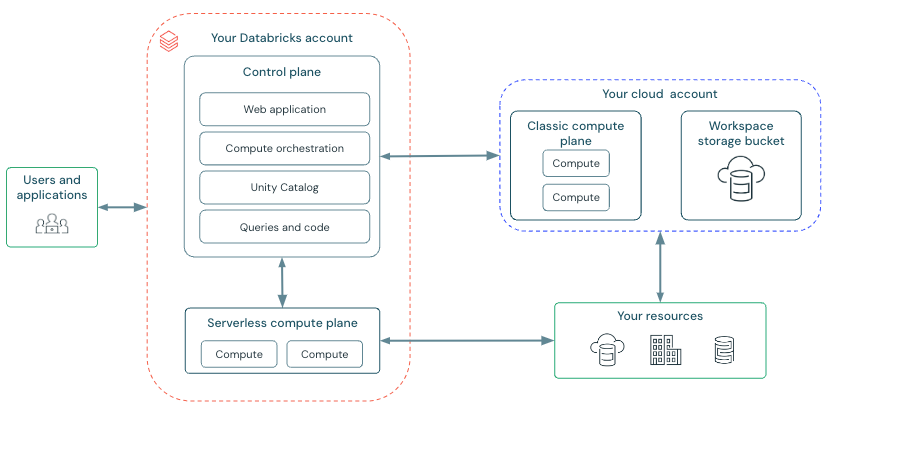
Workspace - Control Plane
- Backend services that Databricks manages in your Databricks account.
- Web application
- Unity Catalog
- Compute orchestration
Workspace - Compute Plane
Classic compute (opens in a new tab)
-
Databricks compute resources run in your AWS account.
-
Types
-
- Use
Jobs computeinstead ofall-purpose computefor jobs. (opens in a new tab) - Jobs compute
terminates automatically after a job run is complete. - You can reuse the same clulster across tasks for better price performance.
- Use
all-purpose computewhen you are developing or testing jobs.
- Use
-
Lakeflow SDP -
SQL warehouses-
Classic- Gist
- Most basic
SQLcompute, less performance thanProandServerlesscompute. - In
customercloud - Supports
Photon engine
- Most basic
- Gist
-
Pro-
More advanced features than
Classic(Predictive IO) -
In
customercloud -
Supports
Photon engine -
Does not support
Intelligent Workload Management -
Less responsive, slower auto scaling than serverless SQL warehouse
-
Use cases
Serverless SQL warehousesare not available in a region.- You have
custom-defined networkingand want to connect to databasesin your network in the cloudoron-premisesforfederationor ahybrid-type architecture.
-
-
-
Instance pools
- Prefer
serverless computetoinstance poolwhenever possible - More responsive, reduce cluster start and scaling time
- Prefer
Access modes
- Standard (opens in a new tab) (shared)
- Dedicated (single user)
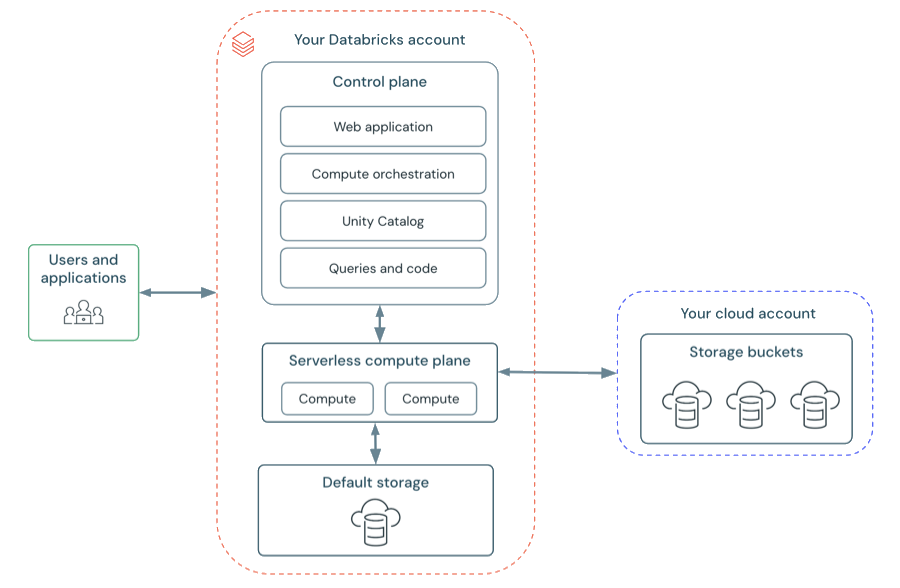
Serverless compute
-
Best practices for serverless compute (opens in a new tab)
-
Migration
- The data being accessed must be stored in Unity Catalog.
- The workload should be compatible with standard compute.
- The workload should be compatible with Databricks Runtime 14.3 or above.
-
-
Advantages
- No operational overhead (managed by Databricks)
- On-demand usage, no costly idle time
- Auto-scaling, no underprovisioning or overprovisioning
- Faster start-up time than starting a classic compute cluster
- Customer data isolated by network and security boundary
SQL warehouseAuto Stopvalue can be as low as1 minute.
-
Types
-
Notebooks
-
- No support for
Continuousscheduling. - No support for
defaultortime-based intervaltriggers inStructured Streaming.
- No support for
-
Lakeflow SDP -
SQL warehouses- Cutting edge features (
Predictive IOandIntelligent Workload Management) - Most cost performant
- Use cases
- ETL
- Business intelligence
- Exploratory analysis
- Cutting edge features (
-
SQL warehouses
-
Optimized compute for
SQL queries,analytics, andbusiness intelligence workloadswithserverlessorclassicoptions. -
Only support
SQL cellsinNotebooks. -
SQL warehouse settings
-
Auto StopWhether the warehouse stops if it's idle for the specified number of minutes
-
Cluster sizeThe size of the
drivernode and number ofworkernodes associated with the cluster -
ScalingThe
minimumandmaximumnumber of clustersthat will be used for a queryDatabricks recommends
a cluster for every 10 concurrent queries.
-
| Warehouse type | Photon Engine | Predictive IO | Intelligent Workload Management |
|---|---|---|---|
| Serverless | X | X | X |
| Pro | X | X | |
| Classic | X |
Delta tables (opens in a new tab)
Delta table types
| Table type | Description |
|---|---|
| Unity Catalog managed table | Always backed by Delta Lake. The default and recommended table type on Databricks. Provides many built-in optimizations. |
| Unity Catalog external table | Optionally backed by Delta Lake. Supports some legacy integration patterns with external Delta Lake clients. |
| Unity Catalog foreign table | Might be backed by Delta Lake, depending on the foreign catalog. Foreign tables backed by Delta Lake do not have many optimizations present in Unity Catalog managed tables. |
| Streaming table | A Lakeflow Spark Declarative Pipelines dataset backed by Delta Lake that includes an append or AUTO CDC ... INTO flow definition for incremental processing. |
Hive metastore table | Foreign tables in an internal or external federated Hive metastore and tables in the legacy workspace Hive metastore. Both managed and external Hive metastore tables can optionally be backed by Delta Lake. |
| Materialized view | A Lakeflow Spark Declarative Pipelines dataset backed by Delta Lake that materializes the results of a query using managed flow logic. |
Delta tables - feature compatibility and protocols (opens in a new tab)
Interface
REST API
REST - Call API endpoint with CLI (opens in a new tab)
# Example
databricks api get $ENDPOINT_PATH-
Example - GET /api/2.0/serving-endpoints (opens in a new tab)
databricks api get /api/2.0/serving-endpoints
CLI (opens in a new tab)
CLI - Setup - Workspace-level

UI -> Settings -> Identity and access -> Service principals
# $HOME/.databrickscfg
# DEFAULT profile doesn't need to be specified explicitly
[DEFAULT]
host          = $workspace_url
client_id     = $service_principal-Application_ID
client_secret = $secret
CLI - Show auth info
databricks auth envCLI - Verify profiles
databricks auth profilesCLI - Show clusters info
databricks clusters spark-versionsCLI - Troubleshoot CLI command execution
Will display underlying HTTP requests and responses.
databricks $COMMAND --debugExample:
> databricks workspace list /Workspace/Users/orange.lavender.9@gmail.com --debug
15:00:25 Info: start pid=48008 version=0.272.0 args="databricks, workspace, list, /Workspace/Users/orange.lavender.9@gmail.com, --debug"
15:00:25 Debug: Loading DEFAULT profile from C:\Users\Takechiyo/.databrickscfg pid=48008 sdk=true
15:00:25 Debug: Failed to configure auth: "pat" pid=48008 sdk=true
15:00:25 Debug: Failed to configure auth: "basic" pid=48008 sdk=true
15:00:26 Debug: GET /oidc/.well-known/oauth-authorization-server
< HTTP/2.0 200 OK
< {
<   "authorization_endpoint": "https://dbc-80546867-03ea.cloud.databricks.com/oidc/v1/authorize",
<   "claims_supported": [
<     "iss",
<     "sub",
<     "aud",
<     "iat",
<     "exp",
<     "jti",
<     "name",
<     "family_name",
<     "given_name",
<     "preferred_username"
<   ],
<   "code_challenge_methods_supported": [
<     "S256"
<   ],
<   "grant_types_supported": [
<     "client_credentials",
<     "authorization_code",
<     "refresh_token"
<   ],
<   "id_token_signing_alg_values_supported": [
<     "RS256"
<   ],
<   "issuer": "https://dbc-80546867-03ea.cloud.databricks.com/oidc",
<   "jwks_uri": "https://ohio.cloud.databricks.com/oidc/jwks.json",
<   "request_uri_parameter_supported": false,
<   "response_modes_supported": [
<     "query",
<     "fragment",
<     "form_post"
<   ],
<   "response_types_supported": [
<     "code",
<     "id_token"
<   ],
<   "scopes_supported": [
<     "all-apis",
<     "email",
<     "offline_access",
<     "openid",
<     "profile",
<     "sql"
<   ],
<   "subject_types_supported": [
<     "public"
<   ],
<   "token_endpoint": "https://dbc-80546867-03ea.cloud.databricks.com/oidc/v1/token",
<   "token_endpoint_auth_methods_supported": [
<     "client_secret_basic",
<     "client_secret_post",
<     "none"
<   ]
< } pid=48008 sdk=true
15:00:26 Debug: Generating Databricks OAuth token for Service Principal (c9fa7fd8-0982-4430-89f3-a8723af7441e) pid=48008 sdk=true
15:00:26 Debug: POST /oidc/v1/token
> <http.RoundTripper>
< HTTP/2.0 200 OK
< {
<   "access_token": "**REDACTED**",
<   "expires_in": 3600,
<   "scope": "all-apis",
<   "token_type": "Bearer"
< } pid=48008 sdk=true
15:00:27 Debug: GET /api/2.0/workspace/list?path=/Workspace/Users/orange.lavender.9@gmail.com
< HTTP/2.0 200 OK
< {} pid=48008 sdk=true
ID  Type  Language  Path
15:00:27 Info: completed execution pid=48008 exit_code=0
15:00:27 Debug: no telemetry logs to upload pid=48008
Workspace UI (opens in a new tab)
UI - Get resource URL/path

PySpark
Lists the contents of a directory
dbutils.fs.ls('/databricks-datasets/data.gov/farmers_markets_geographic_data/data-001/')Use Ctrl + SPACE to trigger autocomplete.
Read a CSV file
SELECT * FROM csv.`dbfs:/databricks-datasets/data.gov/farmers_markets_geographic_data/data-001/market_data.csv`Read a text file
SELECT * FROM csv.`dbfs:/databricks-datasets/data.gov/farmers_markets_geographic_data/README.md`Read a file in binary format (HEX encoded)
SELECT * FROM binaryFile.`dbfs:/databricks-datasets/travel_recommendations_realtime/README.txt`Databricks Connect
- like a
JDBC driver, theDatabricks Connectis alibrarythat allows you to connect to a Databricks cluster from your own application. - Built on
Spark Connect
Lakeflow Connect (opens in a new tab)
-
Gist
40+ GA connectors: Salesforce, Workday, SharePoint, SQL Server, Oracle, Postgres, Redshift, BigQuery, SFTP and more. (databricks.com)Zerobus Ingest connector(opens in a new tab) write API streams events straight intoUnity Catalogat~100 MB/swith5s end-to-lake latency.- Source-aware
CDCoptimisations so you don’t babysit log positions.
Lakeflow Connect - Manual File Uploads (opens in a new tab)
Lakeflow Connect - Managed connectors (opens in a new tab)
-
Maintained by Databricks
-
Types
-
SaaS connectors (opens in a new tab)
- Google Analytics
- Salesforce
- Workday
- SharePoint
- ServiceNow
-
Database connectors (opens in a new tab)
- SQL Server
-
Lakeflow Connect - Standard connectors (opens in a new tab)
-
Sources
-
Cloud object storage
- Amazon S3 (
s3://) - Azure Data Lake Storage (
ADLS, abfss://) - Google Cloud Storage (
GCS, gs://) - Azure Blob Storage (
wasbs://) - Databricks File System (
DBFS, dbfs:/)
- Amazon S3 (
-
SFTP servers
-
Apache Kafka
-
Amazon Kinesis
-
Google Pub/Sub
-
Apache Pulsar
-
-
Ingestion methods
-
Batch
-
Gist
- Load data as
batches of rows into Databricks, often based on a schedule. - Traditional batch ingestion
processes all recordseach time it runs
- Load data as
-
Usage
CREATE TABLE AS (CTAS)spark.read.load()
-
-
Incremental Batch
-
Gist
Only new data is ingested, previously loaded records areskipped automatically.
-
Usage
COPY INTOspark.readStream(Auto Loaderwithtimed trigger(opens in a new tab))- Declarative Pipelines:
CREATE OR REFRESH STREAMING TABLE
-
-
Streaming
-
Gist
Continuously load datarows or batches of data rows as it is generated so you can query it as itarrives in near real-time.Micro-batchprocesses small batches avery short, frequent intervals
-
Usage
spark.readStream(Auto Loaderwithcontinuous trigger(opens in a new tab))- Declarative Pipelines: (trigger mode continuous)
-
-
Standard connectors - Cloud object storage - CREATE TABLE AS (CTAS)
- Batch method
SQL Reference - CREATE TABLE [USING] (opens in a new tab)
Standard connectors - Cloud object storage - COPY INTO (opens in a new tab)
-
Incremental batch
-
Idempotent
-
Easily configurable file or directory filters from cloud storage
S3, ADLS, ABFS, GCS, and Unity Catalog volumes
-
Support for multiple source file formats
CSV, JSON, XML, Avro, ORC, Parquet, text, and binary files
-
Target table schema inference, mapping, merging, and evolution
-
load data from a file location into a
Delta table
SQL Reference - COPY INTO (opens in a new tab)
Standard connectors - Cloud object storage - Auto Loader (opens in a new tab)
-
Built on
Structured Streaming, providing aStructured Streaming sourcecalledcloudFiles. -
Declarative Pipeline-
Python
spark.readStream .format("cloudFiles) -
SQL
Example:
CREATE OR REFRESH STREAMING TABLE csv_data (
  id int,
  ts timestamp,
  event string
)
AS SELECT * FROM STREAM read_files(
  's3://bucket/path',
  format => 'csv',
  schema => 'id int, ts timestamp, event string'
);
-
-
Incremental batchorstreaming, alternative and successor toCOPY INTO
Auto Loader - Schema Inference and Evolution
-
Specifying a target directory for the option
cloudFiles.schemaLocationenablesschema inference and evolution. -
If you use
Lakeflow SPD,Databricks manages schema location and other checkpoint information automatically. -
Schema Inference
- Use directory
_schemasat the configuredcloudFiles.schemaLocationto track schema changes to the input data over time. - For formats that don't encode data types (
JSON,CSV, andXML),Auto Loaderinfers all columns asstrings(including nested fields in JSON files). - For formats with typed schema (
ParquetandAvro),Auto Loadersamples a subset of files and merges the schemas of individual files.
- Use directory
cloudFiles.schemaEvolutionMode
addNewColumns and failOnNewColumns require human intervention to confirm.
cloudFiles.schemaEvolutionMode - addNewColumns (default)
-
Stream fails.
-
New Columns are added to the schema.
-
Existing columns do not evolve data types.
cloudFiles.schemaEvolutionMode - rescue
-
Stream doesn't fail.
-
Schema is not evolved.
-
New columns are recorded in the
rescued data column.
cloudFiles.schemaEvolutionMode - failOnNewColumns
-
Stream fails.
-
Stream does not restart unless the provided schema is updated, or the offending data file is removed.
cloudFiles.schemaEvolutionMode - none
-
Stream doesn't fail.
-
Schema is not evolved.
-
New columns are ignored.
Lakeflow Spark Declarative Pipelines (SDP, previously DLT)
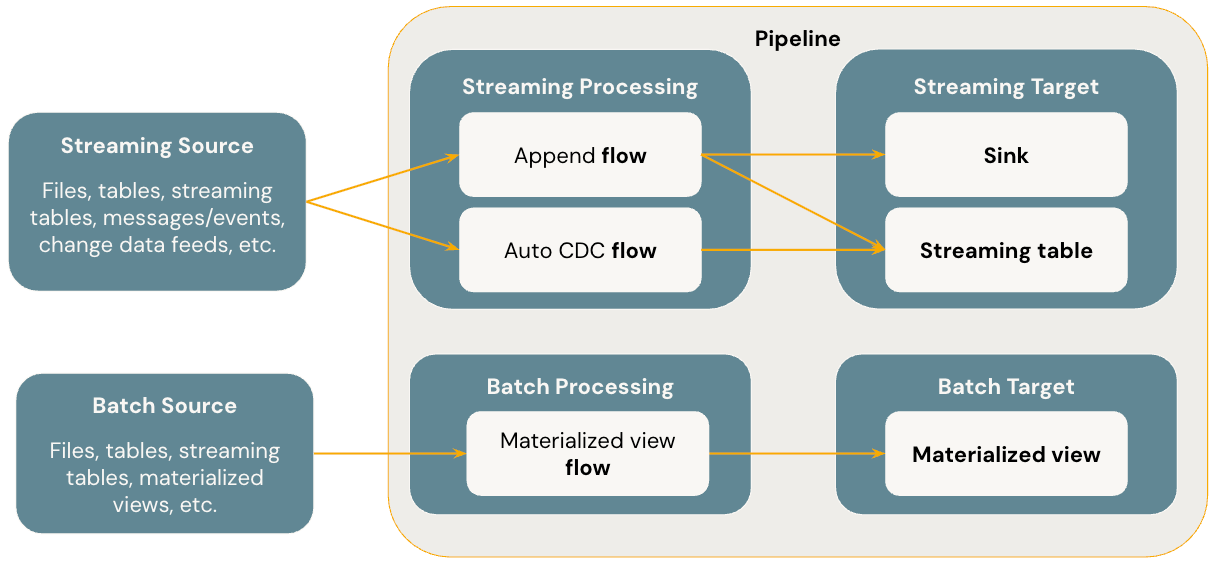
-
Benefits
-
Automatic orchestration
-
Declarative processing
-
Incremental processing
-
The engine will only process new data and changes in the data sources whenever possible.
Incremental refresh for
materialized views(opens in a new tab)
-
-
-
DLT
DLTdoes not support shared clusters. You need to configure the cluster (ajobs cluster) via theDLTuse (under workflows).- You would still write your notebook with
DLTusing Python but the pipeline itself has to be configured via the UI and run from the UI.
-
From DLT to LDP
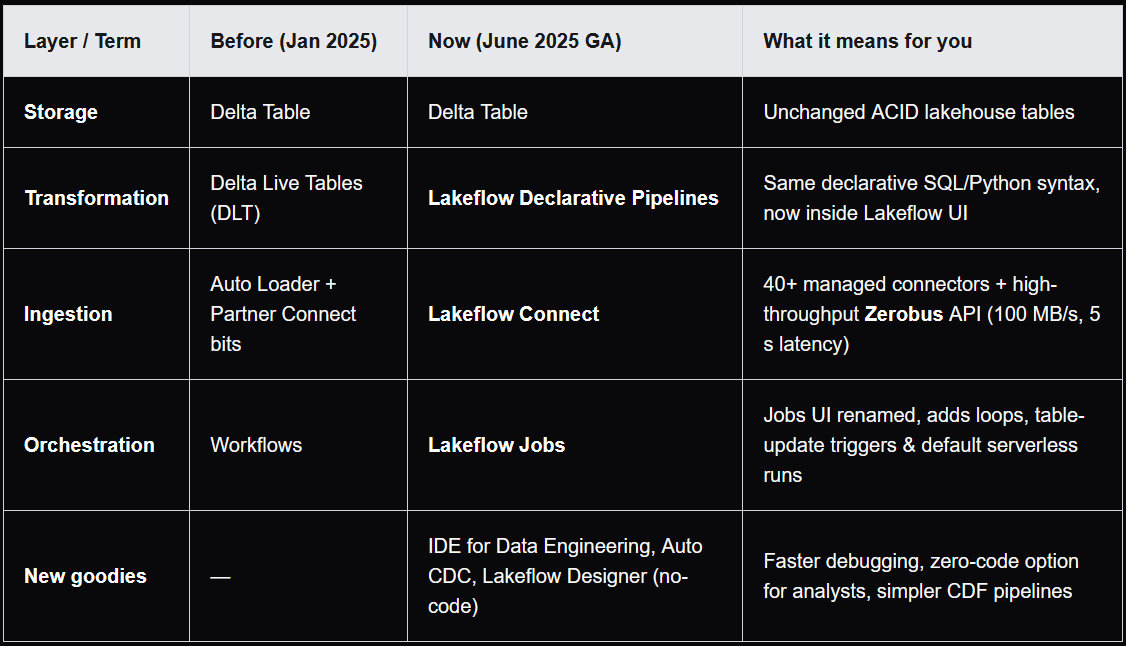
-
Gist
- Same
CREATE LIVE TABLEDSL, now built onSpark Declarative Pipelines, an open standard you can run anywhereSparkruns (opens in a new tab). - New IDE for Data Engineering:
side-by-side code&DAG,inline data previews,Git integrationand anAI copilot. AUTO CDC ...inSQL/create_auto_cdc_flow()inPythonreplace manualAPPLY CHANGES.Lakeflow SDPprovide a declarative approach to definingrelationships between datasets and transformations.
- Same
-
SQL
SQLcode thatcreates pipeline datasetsuses theCREATE OR REFRESHsyntax to definematerialized viewsandstreaming tablesagainst query results.The
STREAMkeyword indicates if the data source referenced in aSELECTclause should be read withstreaming semantics.-
LIVE
Legacy publishing modeuses theLIVE virtual schema(opens in a new tab) to achieve similar behavior. In thedefault publishing mode(used byall new pipelines), theLIVEkeyword is ignored.In
legacy publishing modepipelines, you can use theLIVEkeyword toreference other datasets in the current pipeline for reads, e.g.SELECT * FROM LIVE.bronze_table. In thedefault publishing modefor newLakeflow Spark Declarative Pipelines, this syntax is silently ignored, meaning thatunqualified identifiers use the current schema.
-
-
Resources
Lakeflow SPD - Pipeline Mode (opens in a new tab)
| Key questions | Triggered | Continuous |
|---|---|---|
| When does the update stop? | Automatically once complete. | Runs continuously until manually stopped. |
| What data is processed? | Data available when the update starts. | All data as it arrives at configured sources. |
| What data freshness requirements is this best for? | Data updates run every 10 minutes, hourly, or daily. | Data updates are desired between every 10 seconds and a few minutes. |
Pipeline Mode - Triggered (opens in a new tab)
Lakeflow SDPstops processing after successfully refreshing all tables or selected tables, ensuring each table in the update is refreshed based on the data available when the update starts.- You can schedule
triggered Lakeflow SPDto run as ataskin ajob.
Pipeline Mode - Continuous (opens in a new tab)
Lakeflow SDP processes new data as it arrives in data sources to keep tables throughout the pipeline fresh.
Lakeflow SPD - Pricing (opens in a new tab)
Lakeflow SPD - Flows (opens in a new tab)
-
Lakeflow SPD unique flow types
-
- Streaming flow
- Handles
out of order CDC eventsand supports bothSCD Type 1 and 2(Auto CDCis not available inApache Spark Declarative Pipelines).
Example:
CREATE OR REFRESH STREAMING TABLE atp_cdc_flow AS AUTO CDC INTO atp_silver -- Target table to update with SCD Type 1 or 2 FROM STREAM atp_bronze -- Source records to determine updates, deletes and inserts KEYS (player) -- Primary key for identifying records APPLY AS DELETE WHEN operation = "DELETE" -- Handle deletes from source to the target SEQUENCE BY ranking_date -- Defines order of operations for applying changes COLUMNS * EXCEPT (ranking_date, operation, sequenceNum) -- Select columns and exclude metadata fields STORED AS SCD TYPE 1 -- Use SCD Type 1 -
Materialized View
- Batch flow
-
Lakeflow SPD - Streaming Tables (opens in a new tab)
-
Each input row is handled only once.
-
The
STREAMkeyword beforeread_filestells the query totreat the dataset as a stream. -
Trigger Policy
ContinuousOnceTimed
-
Example
CREATE OR REFRESH STREAMING TABLE atp_bronze AS
SELECT
  *
FROM
  STREAM read_files(
    '/Volumes/workspace/experiment/atp/*.csv',
    format => "csv",
    sep => ",",
    header => true
  );

CREATE OR REFRESH STREAMING TABLE atp_silver AS
SELECT
  player,
  points
FROM
  STREAM atp_bronze;

CREATE OR REFRESH MATERIALIZED VIEW atp_gold AS
SELECT
  player,
  SUM(points) AS total_points
FROM
  atp_silver
GROUP BY
  player
ORDER BY
  player;
Lakeflow SPD - Materialized Views (opens in a new tab)
Lakeflow SPD - Data Quality
Expectations (opens in a new tab)
| Recommendation | Impact |
|---|---|
| Store expectation definitions separately from pipeline logic. | Easily apply expectations to multiple datasets or pipelines. Update, audit, and maintain expectations without modifying pipeline source code. |
| Add custom tags to create groups of related expectations. | Filter expectations based on tags. |
| Apply expectations consistently across similar datasets. | Use the same expectations across multiple datasets and pipelines to evaluate identical logic. |
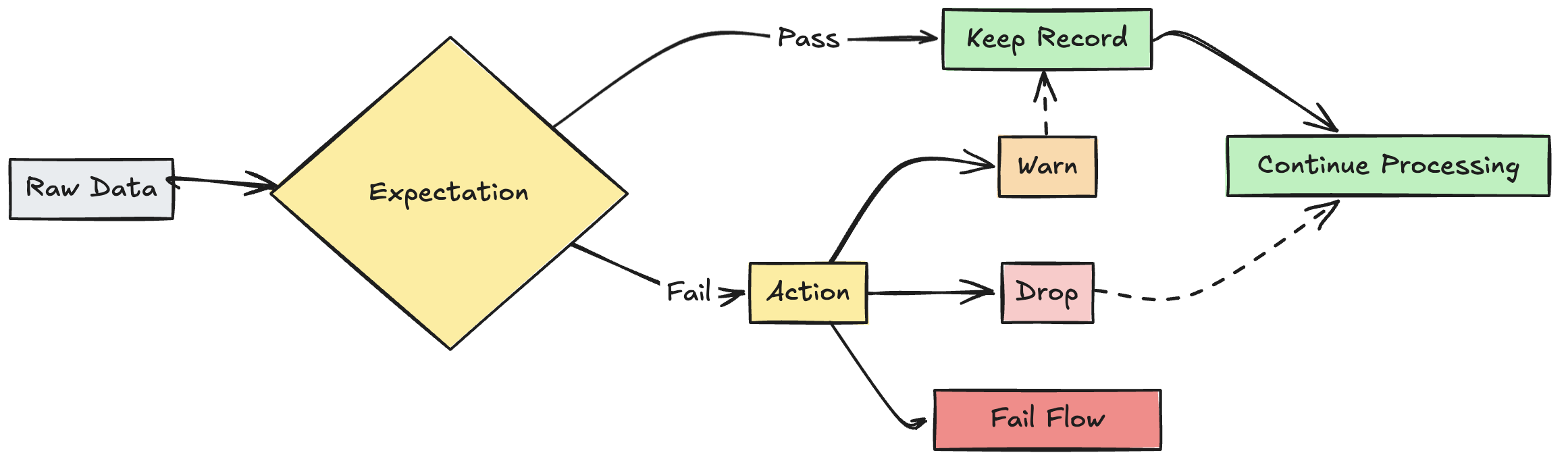
Lakeflow SPD - Expectations - On Violation
-
warn
Invalid records are written to the target.
EXPECT -
drop
Invalid records are dropped before data is written to the target.
EXPECT ... ON VIOLATION DROP ROW -
fail
Invalid records prevent the update from succeeding.
EXPECT ... ON VIOLATION FAIL UPDATE
Lakeflow SPD - Compute
Lakeflow SPD - Compute - Serverless
Lakeflow SPD - Compute - Classic
Lakeflow SPD - Compute - Classic - Core
- Declarative Pipelines in Python and SQL
Lakeflow SPD - Compute - Classic - Pro
- Declarative Pipelines in Python and SQL
- CDC
Lakeflow SPD - Compute - Classic - Advanced
- Declarative Pipelines in Python and SQL
- CDC
- Data Quality Control
Lakeflow SPD - DLT - SQL
Lakeflow Jobs (previously Workflows)
-
Gist
- Everything
Workflowsdid, plusloops,conditionals,parameter-scoped retriesandtable-update triggers. Serverless performance modeGA:3–5× faster cold starts, orcost-optimised modeif pennies matter.- Unified
Jobs & Pipelinesleft-nav entry: no more hunting for 2 icons.
- Everything
Lakeflow Jobs - Jobs
- A
jobis used to schedule and orchestratetaskson Databricks in a workflow.
Lakeflow Jobs - Schedules and Triggers
-
Trigger types
- Time-based schedules
- Continuous
- File arrival events
- Table update events
- Manual
Lakeflow Jobs - Tasks (opens in a new tab)
-
Gist
- A
jobcan have one or moretasksin it. - Each
taskcan use differentcomputeresources. - You can schedule
triggeredLakeflow SPDto run as ataskin ajob. Job parametersare defined at the job level, and passed to alltasksin the samejob.Job parameterstake precedence overtask parameters. If ajob parameterand atask parameterhave thesame key,the job parameter overrides the task parameter.
- A
-
Types of tasks
- Notebook
- Python script
- Python wheel
- SQL
- Pipeline
- Dashboards
- Power BI
- dbt
- dbt platform (Beta)
- JAR
- Spark Submit
- Run Job
- If/else
- For each
Lakeflow Jobs - Tasks - Task parameters
Lakeflow Jobs - Tasks - Task values
Lakeflow Jobs - Tasks - Iterative tasks
For Eachloops over an input array and runs the same nested task per item, passing it as{{input}}.For Eachtask is the container task that manages the loop.- Nested tasks in the loop are the actual tasks that executes for each iteration.
Unity Catalog (opens in a new tab)
-
Data Governance (opens in a new tab)
-
Data Access Control (opens in a new tab)
Layer Purpose Mechanisms Workspace-level restrictions Limit which workspaces can access specific catalogs, external locations, and storage credentials Workspace-level bindings Privileges and ownership Control access to catalogs, schemas, tables, and other objects Privilege grants to users and groups, object ownership Attribute-based policies (ABAC) Use tags and policies to dynamically apply filters and masks ABAC policies and governed tags Table-level filtering and masking Control what data users can see within tables Row filters, column masks, dynamic views -
Data Access Audit
Capture and record all access to data
-
Data Discovery
Ability to search for and discover authorized assets
-
-
Gist
Each cloud regionhas its ownUnity Cataloginstance.
-
Managed storage location (opens in a new tab)
Associated Unity Catalog object How to set Relation to external locations Metastore Configured by account admin during metastore creation. Cannot overlap an external location. Standard catalog Specified during catalog creation using the MANAGED LOCATIONkeyword.Must be contained within an external location. Foreign catalog Specified after catalog creation using Catalog Explorer. Must be contained within an external location. Schema Specified during schema creation using the MANAGED LOCATIONkeyword.Must be contained within an external location. - You can associate a
managed storage locationwith ametastore,catalog, orschema.Managed storage locationsat lower levelsin the hierarchy override storage locations definedat higher levelswhen managed tables or managed volumes are created. - You can choose to
store data at the metastore level, providing adefault storage location for catalogs that don't have a managed storage location of their own. - Databricks recommends that
you assign managed storage at the catalog level for logical data isolation, with metastore-level and schema-level as options.
- You can associate a
Unity Catalog - Data Lineage (opens in a new tab)
-
Gist
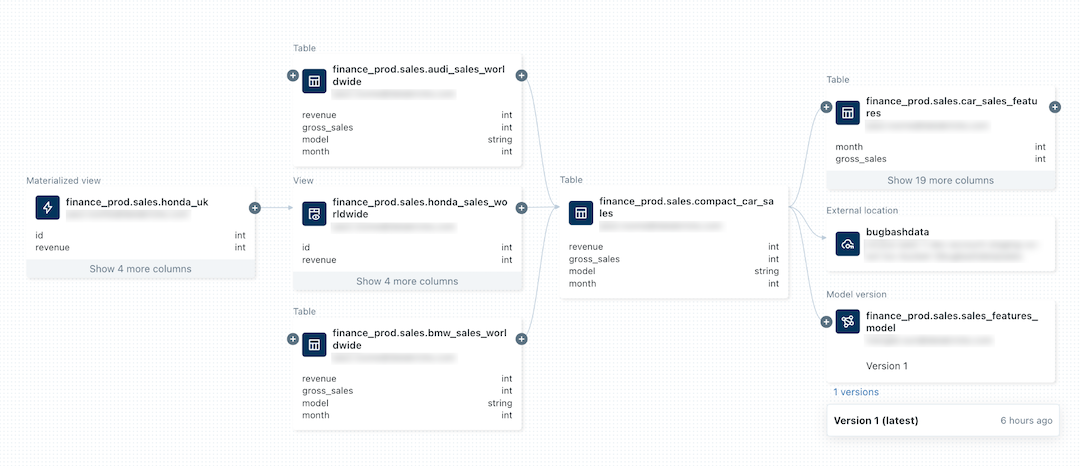
Tracks and visualizes the origin and usage of data assets, providing transparency and traceability.- You must have at least the
BROWSEprivilege on theparent catalog of the table or view. - Lineage is supported for
all languagesand is captured down to thecolumn level. - Lineage data includes
notebooks,jobs, anddashboardsrelated to thequery. - Lineage can be visualized in
Catalog Explorerin near real time and retrieved programmatically using the lineage system tables and the Databricks REST API. - Lineage is
aggregated across all workspaces attached to a Unity Catalog metastore. This means thatlineage captured in one workspaceis visible inany other workspace that shares that metastore. - Lineage data is
retained for 1 year. - Detailed information about
workspace-level objectslikenotebooksanddashboardsin other workspaces ismasked.
-
System table:
system.access.table_lineage(opens in a new tab)
Unity Catalog - Metastore (opens in a new tab)
-
Gist
- Top-level container for metadata in Unity Catalog
- There can be multiple
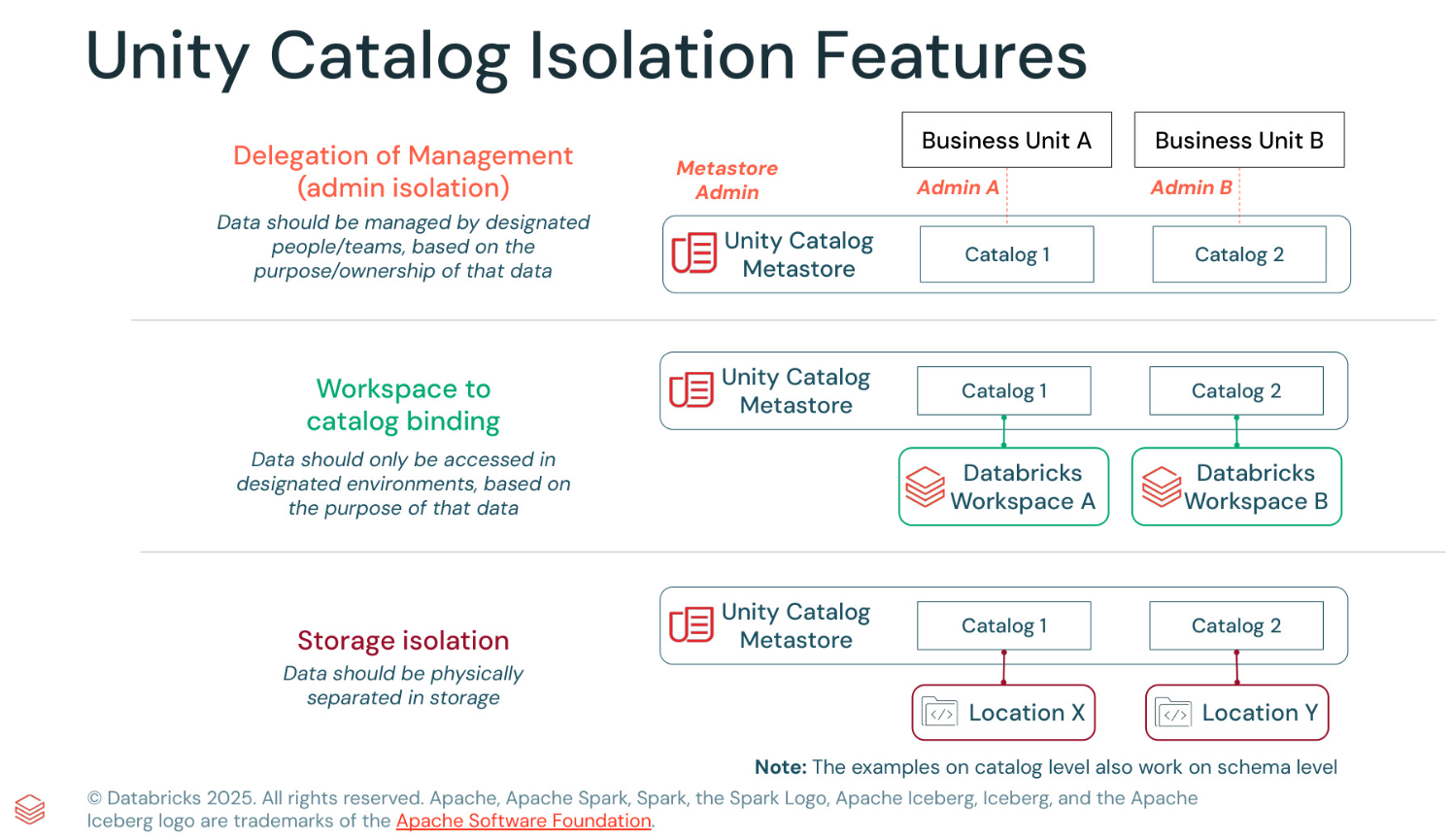
metastoresin a singleaccount, but you can haveonly one metastore per region. - For aworkspaceto useUnity Catalog, it must have aUnity Catalogmetastoreattached. All workspaces in one region share the only metastore. You can linka single metastoretomultiple workspacesin the same region, giving each workspace the same data view.Metastoresprovide regional isolation but arenot intended as default units of data isolation, with noManaged storageset. Data isolation typically begins at the catalog level (Managed storageconfig).
-
Ownership
Metastore adminsare the owners of themetastore.Metastore adminscan reassign ownership of the metastore by transferring the metastore admin role.
Unity Catalog - Catalog (opens in a new tab)
- Gist
- Your Databricks account has
only one metastore per region, catalogs are inherently isolated by region. - Each
catalogtypically hasits own managed storage locationto store managed tables and volumes, providingphysical data isolation at the catalog level. - By default, a
catalogis shared with allworkspacesattached to the parentmetastore. Workspace-catalog binding(opens in a new tab) can be used to limitcatalogaccess to specificworkspacesin your account.- Always assign ownership of production catalogs and schemas to groups, not individual users.
- Grant
USE CATALOGandUSE SCHEMAonly to userswho should be able to see or query the data contained in them.
- Your Databricks account has
Unity Catalog - Views
Unity Catalog - Volumes (opens in a new tab)
-
Use cases
- Register landing areas for raw data produced by external systems to support its processing in the early stages of ETL pipelines and other data engineering activities.
Register staging locations for ingestion. e.g. usingAuto Loader,COPY INTO, orCTAS (CREATE TABLE AS) statements.- Provide file storage locations for data scientists, data analysts, and machine learning engineers to use as parts of their exploratory data analysis and other data science tasks.
- Give Databricks users access to arbitrary files produced and deposited in cloud storage by other systems. For example, large collections of unstructured data (such as image, audio, video, and PDF files) captured by surveillance systems or IoT devices, or library files (JARs and Python wheel files) exported from local dependency management systems or CI/CD pipelines.
- Store operational data, such as logging or checkpointing files.
- Recommended for managing all access to
non-tabular data in cloud object storageand forstoring workload support files.
-
catalog.schema.volume -
Access pattern
/Volumes/<catalog>/<schema>/<volume>/<path>/<file-name>or
dbfs:/Volumes/<catalog>/<schema>/<volume>/<path>/<file-name>
Separation of metastore management
-
Databricks workspaces management before and after Unity Catalog
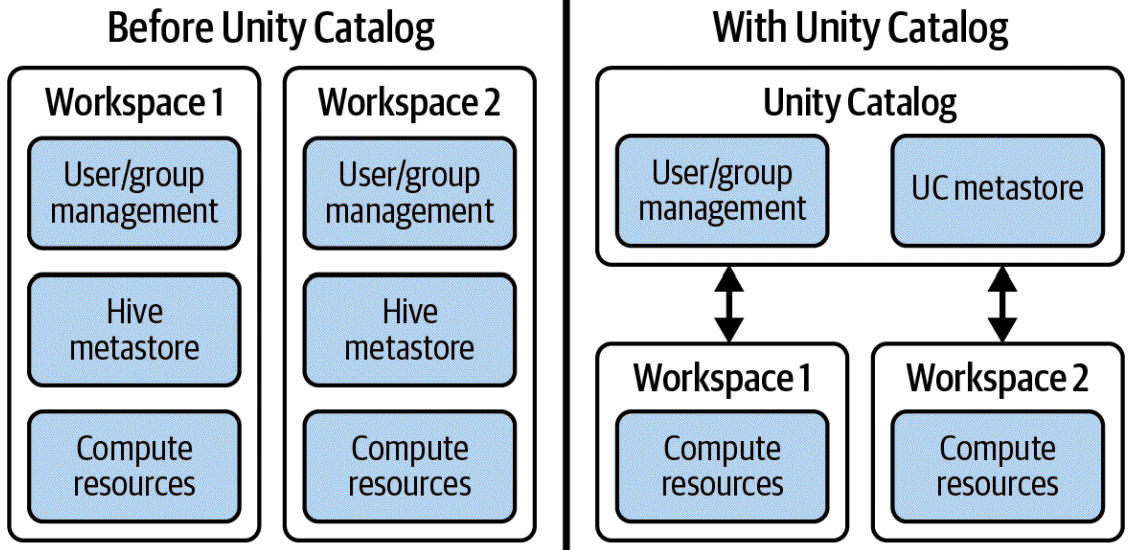
Unity Catalog - Privileges
-
Each
catalogtypically has its own managed storage location to store managed tables and volumes, providingphysical data isolation at the catalog level.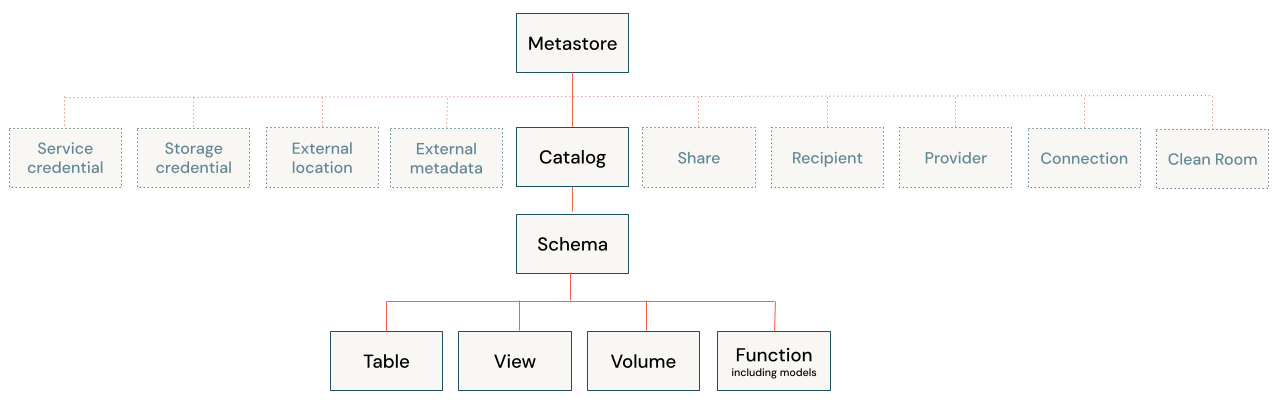
3 Level hierarchy:
catalog.schema.table-
Catalog
Object privileges
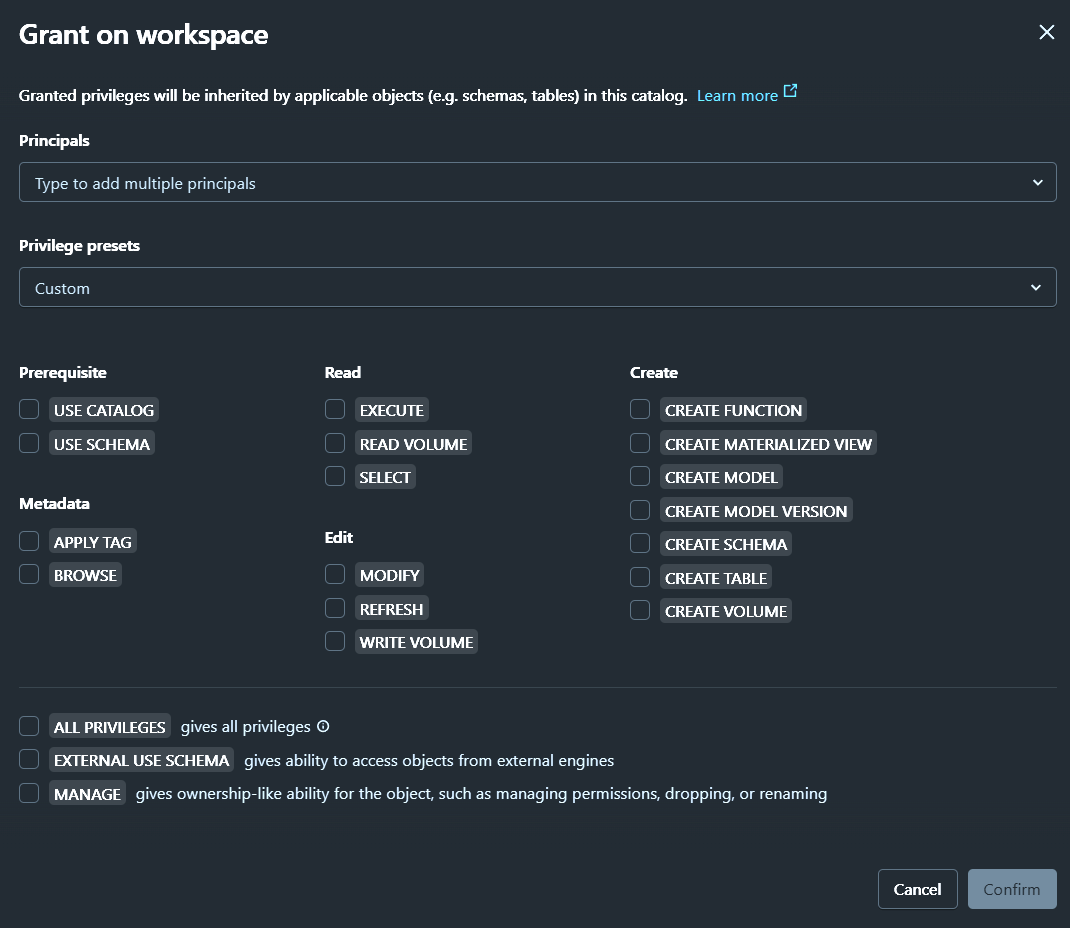
-
Schema (Database)
Object privileges
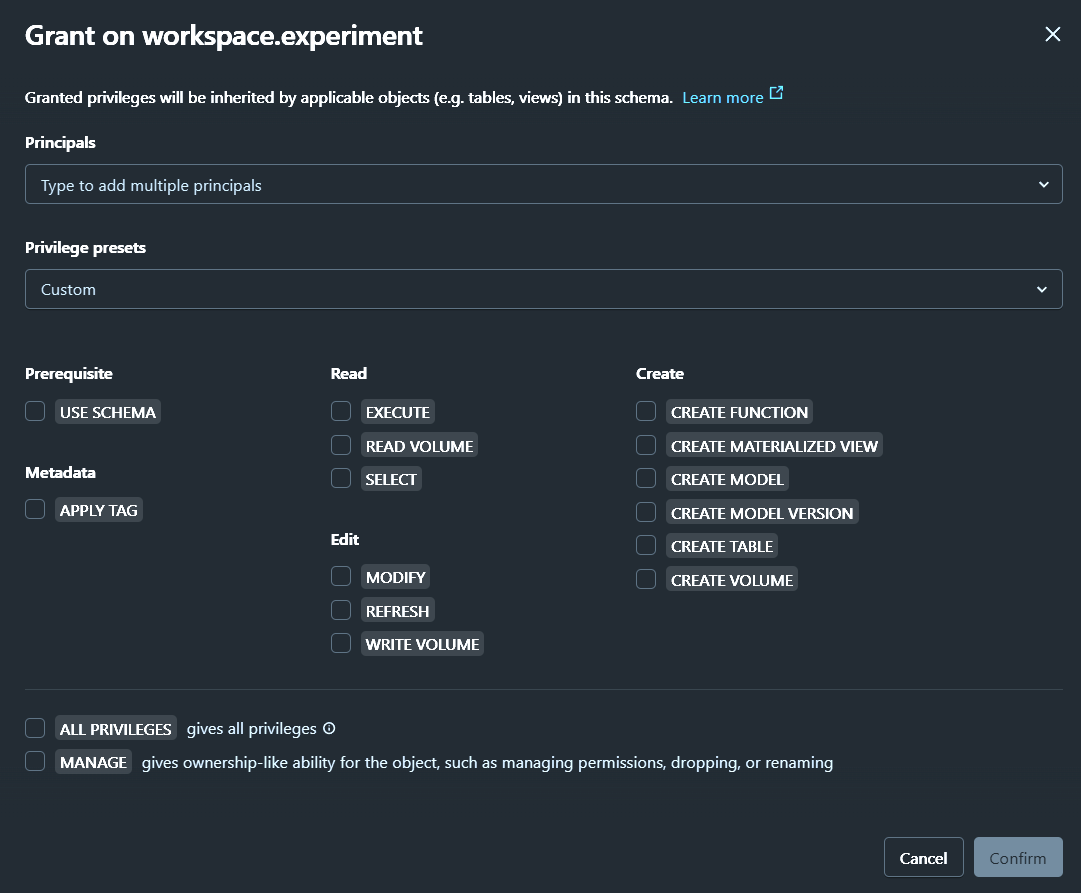
-
Table / View / Function
Object privileges
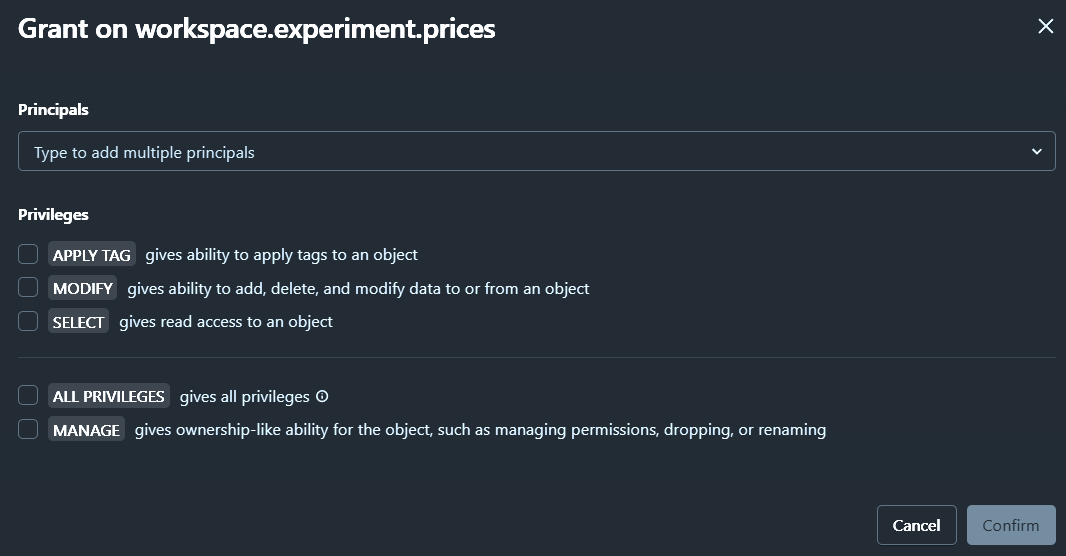
-
Identity / Principal (opens in a new tab)
Principalscan begranted privilegesand can besecurable objects owner.- Allow
identitiesto be created once at theaccount leveland then assigned to multipleworkspacesas needed.
User (opens in a new tab)
- Represented by an
email address
Service principal (opens in a new tab)
- Represented by an
application ID - The
creator of a service principalautomatically becomes theservice principal manager.
Group (opens in a new tab)
Ownership (opens in a new tab)
-
Gist
- Each
securable objectin Unity Catalog has anowner. - The
principalthatcreates an objectbecomes itsinitial owner. - An object's
ownerhasall privileges on the objectbut not on any of its child objects. - Can
grant privileges on the object itself and on all of its child objects to other principals. - Can drop the object.
- Owners can grant the
MANAGEprivilege todelegate ownership abilities on an object to other principals. - Catalog and schema owners
can transfer ownership of any objectin the catalog or schema.
- Each
-
Example
Owners of a schemadonot automatically have all privileges on the tables in the schema, but theycan grant themselves privileges on the tables in the schema.
Admins (opens in a new tab)
Account admin (opens in a new tab)
- Can
createmetastores, and by default becomethe initial metastore admin. - Can link
metastorestoworkspaces. - Can assign the
metastore adminrole. - Can
grantprivilegesonmetastores. - Can enable
Delta Sharingfor ametastore. - Can configure
storage credentials. - Can enable
system tablesanddelegate access to them. - Can add
service principalsto the account and assign them admin roles. - Can assign
service principalstoworkspaces. - Automatically have
service principal managerrole onall service principalsin the account.
Workspace admin (opens in a new tab)
- Can
addusers,service principals, andgroupsto aworkspace. - Can
delegateotherworkspace admins. - Can
managejobownership. - Can
managethejob Run as setting. - Can
viewandmanagenotebooks,dashboards,queries, andother workspace objects. - Automatically have
service principal managerrole onservice principals they create. - Create tokens on behalf of
service principalswhen they have theService Principal Userrole.
Metastore admin (opens in a new tab)
Metastore adminrole is optional.Metastore adminsare theowners of the metastore.Metastore adminscanreassign ownership of the metastoreby transferring the metastore admin role
Inheritance model (opens in a new tab)
Granting a privilege on a catalog or schemaautomaticallygrants the privilege to all current and future objects within the catalog or schema. If you give a user the SELECT privilege on a catalog, then that user will be able to select (read) all tables and views in that catalog.- Privileges that are granted on a Unity Catalog
metastoreare not inherited. - Owners of an object are automatically granted all privileges on that object.
Securable objects (opens in a new tab)
Privilege types by securable object (opens in a new tab)
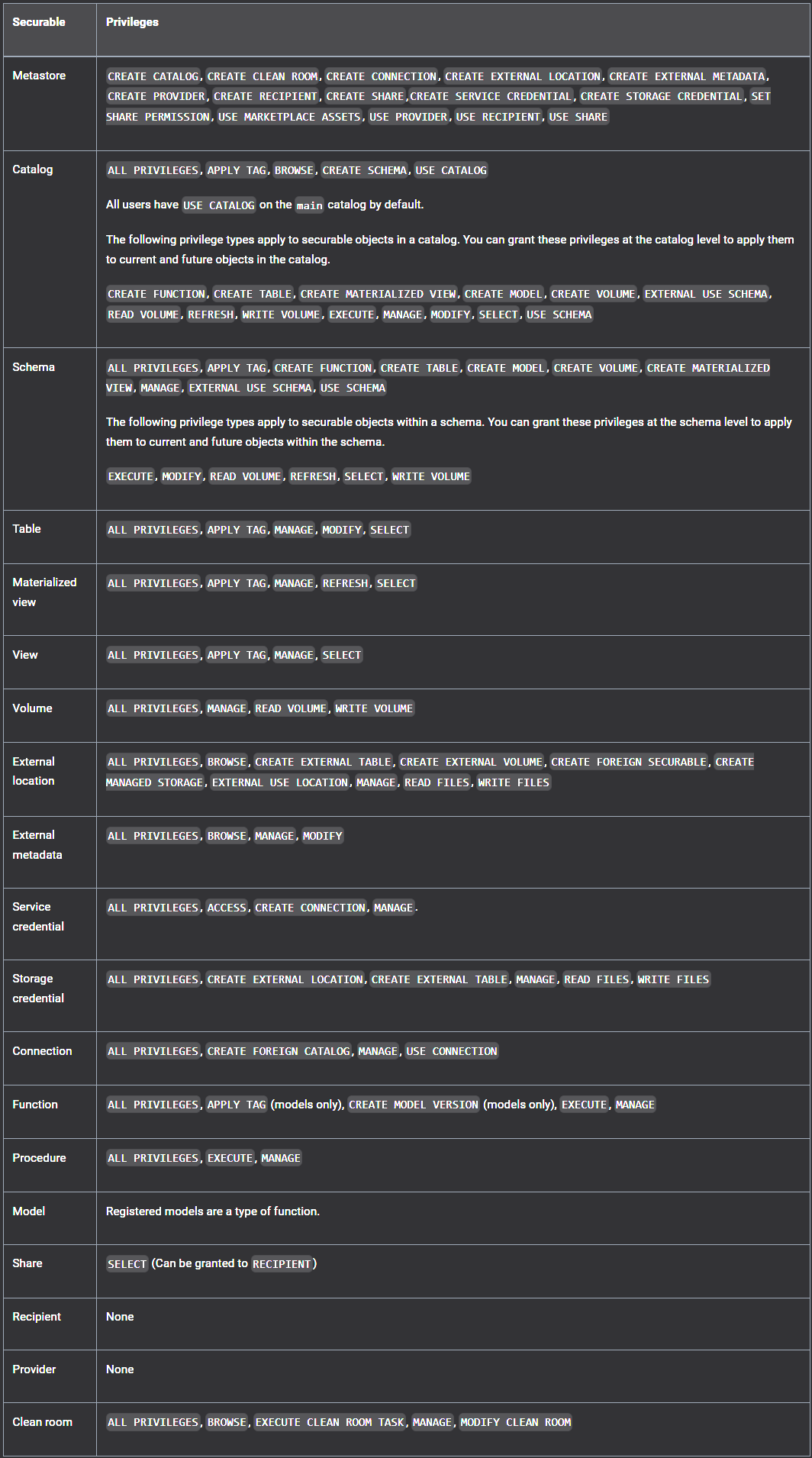
ALL PRIVILEGES
- To avoid accidental data exfiltration or privilege escalation,
ALL PRIVILEGESdoes not include theEXTERNAL USE SCHEMA,EXTERNAL USE LOCATION, orMANAGEprivileges.
Catalog - USE CATALOG (opens in a new tab)
USE CATALOGprivilege on the parent catalog is required to access any schema or table in that catalog.- Not required to read an object's metadata
USE CATALOG | SCHEMAgrants the ability toview data in the catalog or schema.Alone, these privileges do not grant SELECT or READ on the objects inside the catalog or schema, but they are aprerequisite to granting users that access. Grant these privileges only to users who should be able to view data in the catalog or schema.
Catalog - BROWSE
BROWSEallows users toview metadata for objects in a catalogusing Catalog Explorer, the schema browser, search, the lineage graph, information_schema, and the REST API. Itdoes not grant access to data.BROWSEenables users todiscover data and request access to it, even if they do not have theUSE CATALOGorUSE SCHEMAprivileges.- Databricks recommends granting
BROWSEon catalogs to theAll account usersgroupat the catalog leveltomake data discoverable and support access requests.
Schema - USE SCHEMA
USE SCHEMAprivilege on the parent schema is required to access any table in that schema.- Not required to read an object's metadata
MANAGE (opens in a new tab)
-
Similar to ownership
-
Users with the
MANAGEprivilege are not automatically granted all privileges on that object, but they can grant themselves privileges manually. -
The user must also have the
USE CATALOGprivilege on the object's parent catalog and theUSE SCHEMAprivilege on its parent schema. -
ALL PRIVILEGESdoes not include theMANAGEprivilege -
Privileges
- View and manage privileges
- Transfer ownership
- Drop an object
- Rename an object
Manage privileges (opens in a new tab)
SHOW (opens in a new tab)
SHOW GRANTS [principal] ON <securable-type> <securable-name>GRANT
GRANT <privilege-type> ON <securable-type> <securable-name> TO <principal>REVOKE
REVOKE <privilege-type> ON <securable-type> <securable-name> FROM <principal>Docs - UI (opens in a new tab)
In the GitHub repo, Unity Catalog UI (opens in a new tab)
Docs - CLI (opens in a new tab)
In the GitHub repo, CLI - uc (opens in a new tab)
Unity Catalog - Integration with Confluent stack
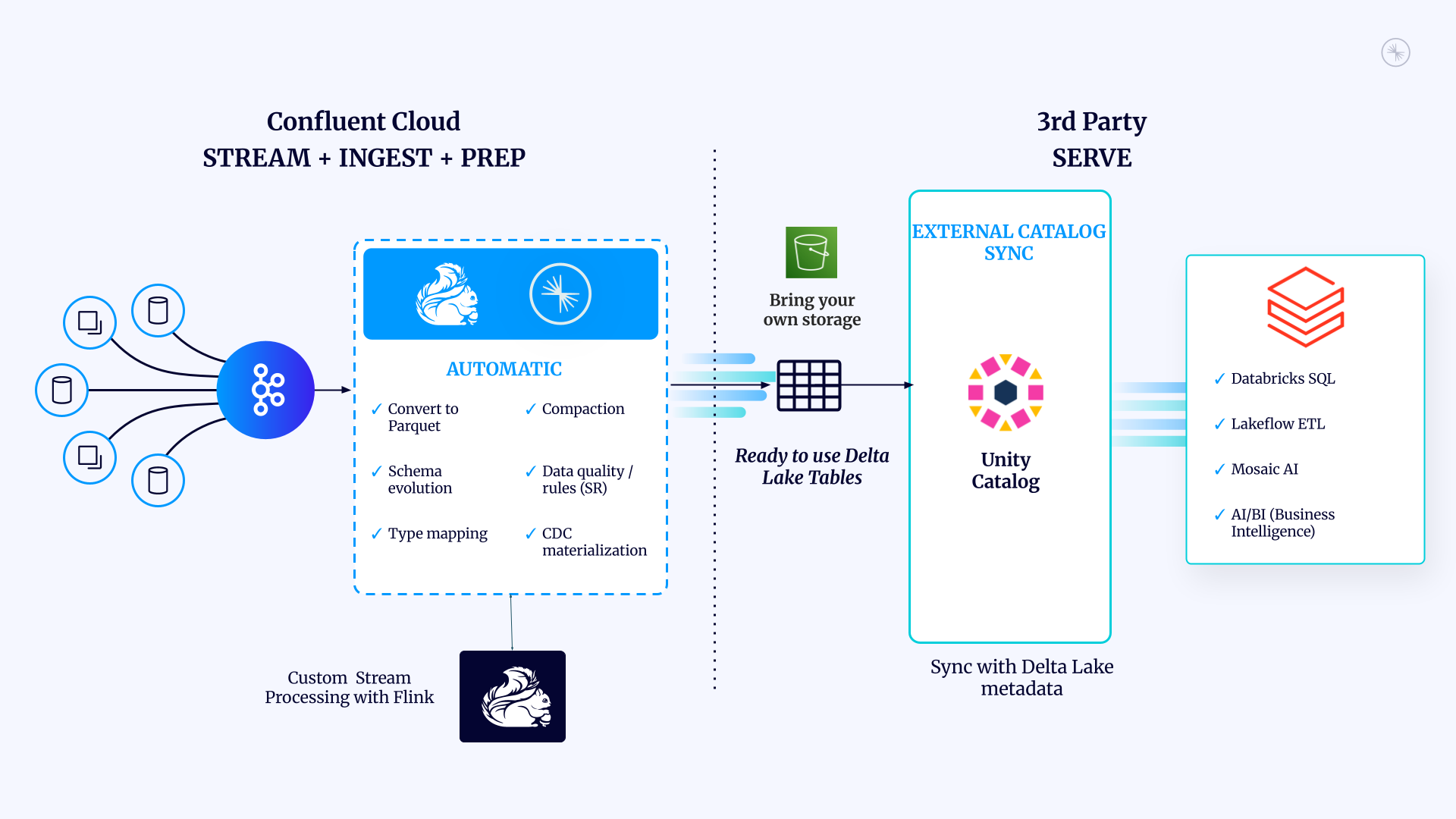
Unity Catalog - Delta Sharing (opens in a new tab)
- Based on Delta Lake - Delta Sharing (opens in a new tab)
Data from other metastorescan be accessed usingDelta Sharingif needed to enablecross-regionalfederation.
Unity Catalog - Predictive Optimization (opens in a new tab)
- Identifies tables that would benefit from
ANALYZE,OPTIMIZE, andVACUUMoperations and queues them to run using serverless compute for jobs. - Only applies to
managed table
Notebooks
Notebooks - Examples - Pivot in SQL (opens in a new tab)
Notebooks - Examples - Read Parquet Files (Scala) (opens in a new tab)
DevOps (opens in a new tab)
Provision Databricks Workspace
- Create
Databricks workspaceswith theDatabricks Terraform provider(opens in a new tab).
Provision Databricks projects and resources
Databricks Asset Bundles (opens in a new tab)
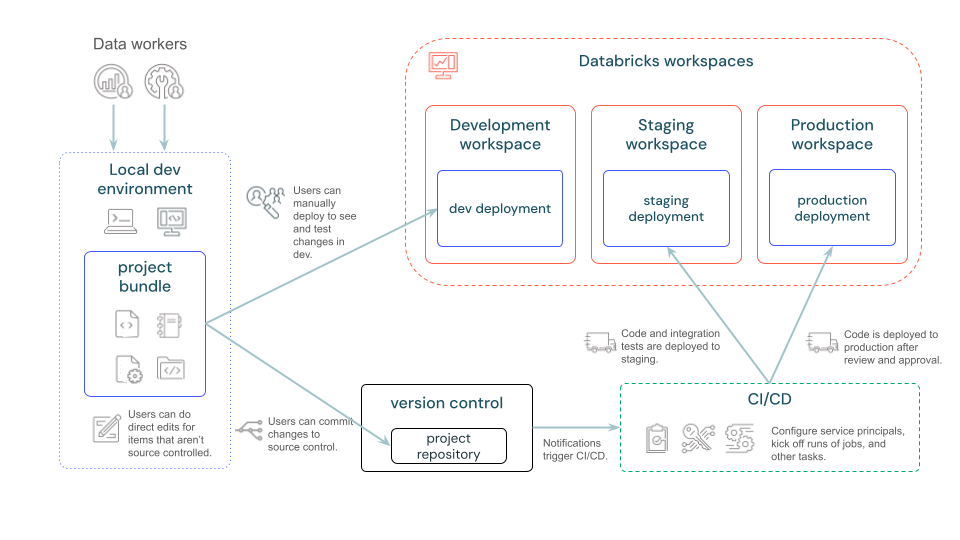
-
Consists of
- Required
cloud infrastructureandworkspace configurations Source files, such as notebooks and Python files, that include the business logicDefinitions and settings for Databricks resources, such as Lakeflow Jobs, Lakeflow Spark Declarative Pipelines, Dashboards, Model Serving endpoints, MLflow Experiments, and MLflow registered modelsUnit testsandintegration tests
- Required
-
Infrastructure-as-code definition file in YAML format to define resources and configuration
-
Use Databricks CLI to operate
-
Use another CI/CD runner (e.g. Jenkins) to schedule and manage the pipeline for provisioning jobs
Databricks Git Folders (Repos) (opens in a new tab)
-
Gist
Clone,push to, andpull froma remote Git repository.Createand manage branches for development work, includingmerging,rebasing, andresolving conflicts.- Create notebooks, including
IPYNB notebooks, and edit them and other files. Visually compare differencesupon commit andresolve merge conflicts.
Data Access
| Object | Object identifier | File path | Cloud URI |
|---|---|---|---|
| External location | no | no | yes |
| Managed table | yes | no | no |
| External table | yes | no | yes |
| Managed volume | no | yes | no |
| External volume | no | yes | yes |
File access (opens in a new tab)
-
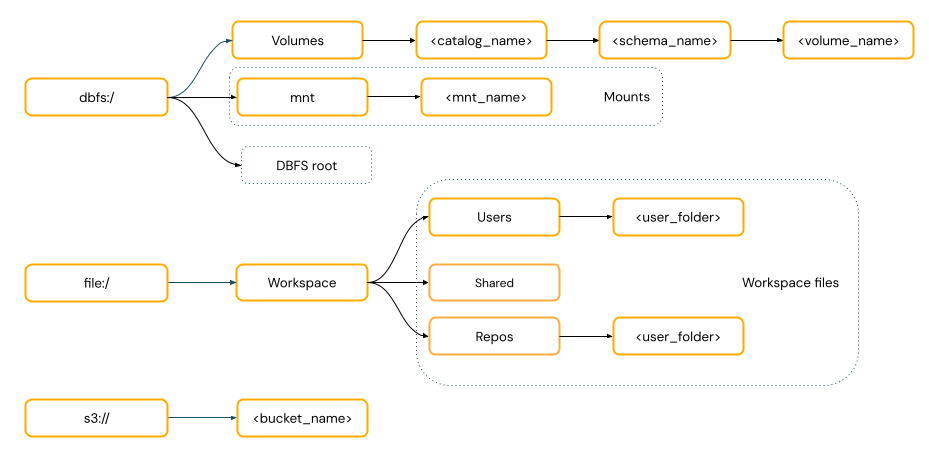
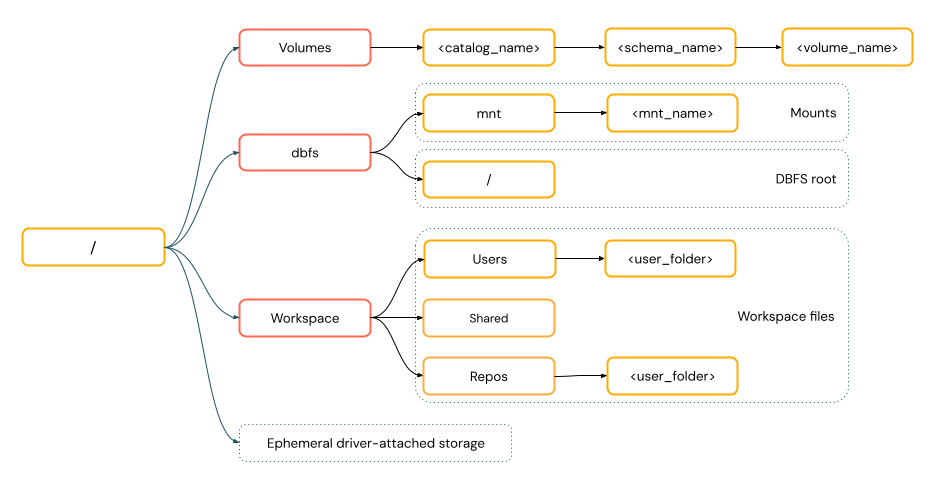
Locations
-
Unity Catalogvolumes -
Workspacefiles -
Cloud object storage
-
DBFSmounts andDBFSroot-
Databricks Utilities (opens in a new tab)
Only work with DBFS
-
-
Ephemeral storage attached to the driver node of the cluster
-
-
Access patterns
URI-style paths
POSIX-style paths
Parameterization
SQL - Parameter markers (opens in a new tab)
- Typed
- The API invoking the SQL statement must supply name-value pairs to associate each parameter marker with a value.
> DECLARE stmtStr = 'SELECT current_timestamp() + :later, :x * :x AS square';
> EXECUTE IMMEDIATE stmtStr USING INTERVAL '3' HOURS AS later, 15.0 AS x;
  2024-01-19 16:17:16.692303  225.00
SQL - Variables (opens in a new tab)
- Typed
- Session-scoped
- Use
DECLARE VARIABLEstatement to declare a variable
-- A verbose definition of a temporary variable
> DECLARE OR REPLACE VARIABLE myvar INT DEFAULT 17;

-- A dense definition, including derivation of the type from the default expression
> DECLARE address = named_struct('street', 'Grimmauld Place', 'number', 12);

-- Referencing a variable
> SELECT myvar, session.address.number;
 17  12
Dynamic value reference
- Use
{{ }}syntax to use dynamic values in job JSON definitions used by the Databricks CLI and REST API.
Task parameter value
- Task-scoped
Job parameter value
- Job-scoped, including all tasks
DAB - Variable reference
${}
Notebook - Widgets (opens in a new tab)
-
Deprecated
${param} -
Current
:param