Takeaway
Configuration
-
To convert a property name to a CLI option, replace
.with-and use--as prefix.For example,
log.dirsbecomes--log.dirs. -
To convert a property name to an environment variable name, replace
.with_and useKAFKA_as prefix.
Cheatsheet
Broker - List all topics
confluent kafka topic list --no-author
kcat -L -b $BROKERBroker - Create a new topic
confluent kafka topic create $topic --no-auth --replication-factor 1CLI - Consume messages
-
CLI
kafka-console-consumerkafka-avro-console-consumerkafka-json-schema-console-consumerkafka-protobuf-console-consumer
-
Run one of the above consumer commands
kafka-protobuf-console-consumer \ --bootstrap-server localhost:9092 \ --from-beginning \ --topic t1-p \ --property schema.registry.url=http://localhost:8081 -
It will consume all messages from the beginning.
Setup
Docker
- Confluent Docs - Install Confluent Platform using Docker (opens in a new tab)
- Docker Configuration Parameters for Confluent Platform - Required Kafka configurations for KRaft mode (opens in a new tab)
- Docker Configuration Parameters for Confluent Platform - Required Kafka configurations for ZooKeeper mode (opens in a new tab)
- Confluent Docs - Docker Image Reference for Confluent Platform (opens in a new tab)
Docker - Container Images
-
Broker
-
Schema Registry
-
confluentinc/cp-schema-registry - Docker Image | Docker Hub (opens in a new tab)
Only compatible with
confluentinc/cp-kafkaimage
-
Docker - Environment Variables
Docker - KAFKA_ADVERTISED_HOST_NAME
Container's IP within docker0's subnet, mapping to advertised.host.name.
docker0 is a bridge
$ ip l show type bridge

3: br-0e97881e642e: <BROADCAST,MULTICAST,UP,LOWER_UP> mtu 1500 qdisc noqueue state UP mode DEFAULT group default
    link/ether 02:42:7f:ce:06:b0 brd ff:ff:ff:ff:ff:ff
4: docker0: <NO-CARRIER,BROADCAST,MULTICAST,UP> mtu 1500 qdisc noqueue state DOWN mode DEFAULT group default
    link/ether 02:42:26:bc:e3:8d brd ff:ff:ff:ff:ff:ff
Docker - KAFKA_LISTENERS
Brokers have two listeners: one for communicating within the Docker network, and one for connecting from the host machine.
Because Kafka clients connect directly to brokers after initially connecting (bootstrapping), one listener uses the container name because it is a resolvable name for all containers on the Docker network.
This listener is also used for inter-broker communication.
The second listener uses localhost on a unique port that gets mapped on the host (29092 for broker-1, 39092 for broker-2, and 49092 for broker-3).
With one node, a single listener on localhost works because the localhost name is conveniently correct from within the container and from the host machine, but this doesn't apply in a multi-node setup.
Docker - KAFKA_PROCESS_ROLES
Docker - KAFKA_CONTROLLER_QUORUM_VOTERS
A comma-separated list of the three controllers
Docker - Multi Node example
# docker-compose.yaml
# Reference: https://hub.docker.com/r/apache/kafka-native
services:
  controller-1:
    image: apache/kafka-native:latest
    container_name: controller-1
    environment:
      KAFKA_NODE_ID: 1
      KAFKA_PROCESS_ROLES: controller
      KAFKA_LISTENERS: CONTROLLER://:9093
      KAFKA_INTER_BROKER_LISTENER_NAME: PLAINTEXT
      KAFKA_CONTROLLER_LISTENER_NAMES: CONTROLLER
      KAFKA_CONTROLLER_QUORUM_VOTERS: 1@controller-1:9093,2@controller-2:9093,3@controller-3:9093
      KAFKA_GROUP_INITIAL_REBALANCE_DELAY_MS: 0

  controller-2:
    image: apache/kafka-native:latest
    container_name: controller-2
    environment:
      KAFKA_NODE_ID: 2
      KAFKA_PROCESS_ROLES: controller
      KAFKA_LISTENERS: CONTROLLER://:9093
      KAFKA_INTER_BROKER_LISTENER_NAME: PLAINTEXT
      KAFKA_CONTROLLER_LISTENER_NAMES: CONTROLLER
      KAFKA_CONTROLLER_QUORUM_VOTERS: 1@controller-1:9093,2@controller-2:9093,3@controller-3:9093
      KAFKA_GROUP_INITIAL_REBALANCE_DELAY_MS: 0

  controller-3:
    image: apache/kafka-native:latest
    container_name: controller-3
    environment:
      KAFKA_NODE_ID: 3
      KAFKA_PROCESS_ROLES: controller
      KAFKA_LISTENERS: CONTROLLER://:9093
      KAFKA_INTER_BROKER_LISTENER_NAME: PLAINTEXT
      KAFKA_CONTROLLER_LISTENER_NAMES: CONTROLLER
      KAFKA_CONTROLLER_QUORUM_VOTERS: 1@controller-1:9093,2@controller-2:9093,3@controller-3:9093
      KAFKA_GROUP_INITIAL_REBALANCE_DELAY_MS: 0

  broker-1:
    image: apache/kafka-native:latest
    container_name: broker-1
    ports:
      - 29092:9092
    environment:
      KAFKA_NODE_ID: 4
      KAFKA_PROCESS_ROLES: broker
      KAFKA_LISTENERS: "PLAINTEXT://:19092,PLAINTEXT_HOST://:9092"
      KAFKA_ADVERTISED_LISTENERS: "PLAINTEXT://broker-1:19092,PLAINTEXT_HOST://localhost:29092"
      KAFKA_INTER_BROKER_LISTENER_NAME: PLAINTEXT
      KAFKA_CONTROLLER_LISTENER_NAMES: CONTROLLER
      KAFKA_LISTENER_SECURITY_PROTOCOL_MAP: CONTROLLER:PLAINTEXT,PLAINTEXT:PLAINTEXT,PLAINTEXT_HOST:PLAINTEXT
      KAFKA_CONTROLLER_QUORUM_VOTERS: 1@controller-1:9093,2@controller-2:9093,3@controller-3:9093
      KAFKA_GROUP_INITIAL_REBALANCE_DELAY_MS: 0
    depends_on:
      - controller-1
      - controller-2
      - controller-3

  broker-2:
    image: apache/kafka-native:latest
    container_name: broker-2
    ports:
      - 39092:9092
    environment:
      KAFKA_NODE_ID: 5
      KAFKA_PROCESS_ROLES: broker
      KAFKA_LISTENERS: "PLAINTEXT://:19092,PLAINTEXT_HOST://:9092"
      KAFKA_ADVERTISED_LISTENERS: "PLAINTEXT://broker-2:19092,PLAINTEXT_HOST://localhost:39092"
      KAFKA_INTER_BROKER_LISTENER_NAME: PLAINTEXT
      KAFKA_CONTROLLER_LISTENER_NAMES: CONTROLLER
      KAFKA_LISTENER_SECURITY_PROTOCOL_MAP: CONTROLLER:PLAINTEXT,PLAINTEXT:PLAINTEXT,PLAINTEXT_HOST:PLAINTEXT
      KAFKA_CONTROLLER_QUORUM_VOTERS: 1@controller-1:9093,2@controller-2:9093,3@controller-3:9093
      KAFKA_GROUP_INITIAL_REBALANCE_DELAY_MS: 0
    depends_on:
      - controller-1
      - controller-2
      - controller-3

  broker-3:
    image: apache/kafka-native:latest
    container_name: broker-3
    ports:
      - 49092:9092
    environment:
      KAFKA_NODE_ID: 6
      KAFKA_PROCESS_ROLES: broker
      KAFKA_LISTENERS: "PLAINTEXT://:19092,PLAINTEXT_HOST://:9092"
      KAFKA_ADVERTISED_LISTENERS: "PLAINTEXT://broker-3:19092,PLAINTEXT_HOST://localhost:49092"
      KAFKA_INTER_BROKER_LISTENER_NAME: PLAINTEXT
      KAFKA_CONTROLLER_LISTENER_NAMES: CONTROLLER
      KAFKA_LISTENER_SECURITY_PROTOCOL_MAP: CONTROLLER:PLAINTEXT,PLAINTEXT:PLAINTEXT,PLAINTEXT_HOST:PLAINTEXT
      KAFKA_CONTROLLER_QUORUM_VOTERS: 1@controller-1:9093,2@controller-2:9093,3@controller-3:9093
      KAFKA_GROUP_INITIAL_REBALANCE_DELAY_MS: 0
    depends_on:
      - controller-1
      - controller-2
      - controller-3
Kubernetes
CLI
kcat
Confluent CLI
-
GitHub - Confluent CLI (opens in a new tab)
- Image:
confluentinc/confluent-cli
- Image:
-
Confluent Docs - Confluent CLI Command Reference (opens in a new tab)
-
Confluent Docs - Confluent CLI compatibility with Confluent Platform (opens in a new tab)
confluent-hub
-
Deploy Kafka connector plugins (JAR files) to
Kafka Connectembedded within theksqlDBserver -
Image:
confluentinc/cp-ksqldb-server
ksqlDB
-
Image:
confluentinc/cp-ksqldb-server -
Resources
Features
Idempotency / Exactly Once
- Producer
-
enable.idempotence=true(default) -
acks=all(default) -
max.in.flight.requests.per.connection=5(default)Enabling idempotence requires
max.in.flight.requests.per.connection<=5, because broker only retainsat most 5 batches for each producer. If more than 5,previous batches may be removed on broker side.
-
Transaction
- Producer
transactional.id=<unique_id_per_producer_instance>(default: null)
- Consumer
-
isolation.level=read_committed(default:read_uncommitted)If set to
read_committed,consumer.poll()will only return transactional messages which have been committed.
-
Concepts
Concept - Topic
-
Definition:
A named stream of records in Kafka — a logical category to which producers write and from which consumers read.
-
Purpose:
Logical organization: Organises data by use-case (e.g., "orders", "user-events").
Concepts - Partition
-
Definition:
An
ordered,immutable,append-onlysequence of records within atopic. Atopicis split into one or morepartitions. -
Purpose:
-
ParallelismDifferent
partitionscan be consumedconcurrently by different consumers in the same consumer group.
-
-
Note:
Number of partitions is set
when creating a topicandcan be increased later(butnot decreased).
Concepts - Replication Factor
-
Definition:
The number of copies of each partition maintained across different brokers, namely
the number of replica. -
Purpose:
-
Faule toleranceandavailabilityIf the leader broker for a partition fails, a replica can be promoted to leader.
-
-
Note:
Replication factorcannot exceedthe number of broker instances.
Workflow
- A single
topicis divided intopartitions, and eachpartitionis stored on abroker. - Each
partitionhas exactly one leader at a time and0ormore followers (replicas)on other brokers. Producersandconsumersinteract only withthe partition's leader.ISRisthe set of followers (replicas) for a partitionthat are up-to-date with theleader(i.e., have caught up to theleader's log within configured lag limits).- Only
replicas in the ISRare eligible to be elected leader if the current leader fails. Producerswithacks=allwait for replication to allISRs before a write is considered committed.- After a
producercommits the transaction, messages and offsets become visible toconsumers.
Broker
Embedded Kafka - Java
-
Confluent
-
Spring Kafka
Broker - Config
Broker - Topic Config Reference
Broker - Partitioning Strategy - How to choose the number of partitions
- Estimate the
max throughput per producer for a single partition - Consider
the number of partitions you will place on each brokerand available diskspace and network bandwidth per broker.
Broker - Replication factor
- Set the
default.replication.factorto at least1above themin.insync.replicassetting. - For more fault-resistant settings, if you have large enough clusters and enough hardware, setting your
replication factorto2above themin.insync.replicas(abbreviated asRF++) can be preferable.RF++will allow easier maintenance and prevent outages. The reasoning behind this recommendation is to allow forone planned outage within the replica setandone unplanned outageto occursimultaneously. - When configuring your cluster for data durability, setting
min.insync.replicasto2ensures that at least2replicas are caught up andin syncwith the producer. This is used in tandem with setting the producer config to ackallrequests. This will ensure that at least2replicas (leader and one other) acknowledge a write for it to be successful.
Serialization / Deserialization
Serializers and Deserializers
Serializers and Deserializers - Testing
-
Option 1 - Multiple instances
Using mock serializers and deserializers, which use mock schema registry client under the hood.
-
Option 2 - Singleton
Using singleton serializers and deserializers, which use singleton mock schema registry under the hood.
-
Must create all necessary singleton Spring Bean definitions to make the whole config consistent.
@Slf4j
@Profile("kafka")
@Configuration
public class KafkaConfig {
    @Bean
    ContainerCustomizer<String, SmsRequested, ConcurrentMessageListenerContainer<String, SmsRequested>> containerCustomizer(
            ConcurrentKafkaListenerContainerFactory<String, SmsRequested> factory,
            ConsumerAwareRebalanceListener rebalanceListener
    ) {
        ContainerCustomizer<String, SmsRequested, ConcurrentMessageListenerContainer<String, SmsRequested>> cust =
                container -> {
                    container.getContainerProperties().setDeliveryAttemptHeader(true);
                    container.getContainerProperties().setConsumerRebalanceListener(rebalanceListener);
                };
        factory.setContainerCustomizer(cust);
        return cust;
    }

    @Bean
    SchemaProvider avroSchemaProvider() {
        return new AvroSchemaProvider();
    }

    @Bean
    AbstractKafkaSchemaSerDeConfig schemaSerDeConfig(KafkaProperties kafkaProperties) {
        var producerProps = kafkaProperties.buildProducerProperties(null);
        return new AbstractKafkaSchemaSerDeConfig(AbstractKafkaSchemaSerDeConfig.baseConfigDef(), producerProps, false);
    }

    @Bean
    SchemaRegistryClient schemaRegistryClient(
            @Value("${spring.kafka.properties.schema.registry.url}") String url,
            SchemaProvider provider,
            AbstractKafkaSchemaSerDeConfig schemaSerDeConfig
    ) {
        KafkaUtils.printSerDeConfig(schemaSerDeConfig);
        return SchemaRegistryClientFactory.newClient(
                Collections.singletonList(url),
                schemaSerDeConfig.getMaxSchemasPerSubject(),
                Collections.singletonList(provider),
                schemaSerDeConfig.originals(),
                schemaSerDeConfig.requestHeaders()
        );
    }

    @Bean
    KafkaAvroSerializer avroValueSerializer(SchemaRegistryClient schemaRegistryClient) {
        return new KafkaAvroSerializer(schemaRegistryClient);
    }

    @Bean
    KafkaAvroDeserializer valueDeserializer(SchemaRegistryClient schemaRegistryClient) {
        return new KafkaAvroDeserializer(schemaRegistryClient);
    }

    @SuppressWarnings({"rawtypes", "unchecked"})
    @Bean
    DefaultKafkaProducerFactoryCustomizer producerFactoryCustomizer(KafkaAvroSerializer avroSerializer) {
        return producerFactory -> {
            producerFactory.setValueSerializer((Serializer) avroSerializer);
            producerFactory.addListener(new CustomProducerFactoryListener<>());
            producerFactory.addPostProcessor(new CustomProducerPostProcessor<>());
        };
    }

    @SuppressWarnings({"rawtypes", "unchecked"})
    @Bean
    DefaultKafkaConsumerFactoryCustomizer consumerFactoryCustomizer(KafkaAvroDeserializer avroDeserializer) {
        return consumerFactory -> {
            consumerFactory.setValueDeserializer((Deserializer) avroDeserializer);
            consumerFactory.addListener(new CustomConsumerFactoryListener());
            consumerFactory.addPostProcessor(new CustomConsumerPostProcessor());
        };
    }
}
-
Avro
Protobuf
Producer
-
FAQ: Producer side settings explained: linger.ms and batch.size (opens in a new tab)
-
Hevo - Critical Kafka Producer Config Parameters Simplified (opens in a new tab)
-
Medium - Building a lossless Kafka Producer (opens in a new tab)
-
GitHub - hevoio/recoverable-kafka-producer (opens in a new tab)
-
Hands On: Tuning the Apache Kafka Producer Client (opens in a new tab)
-
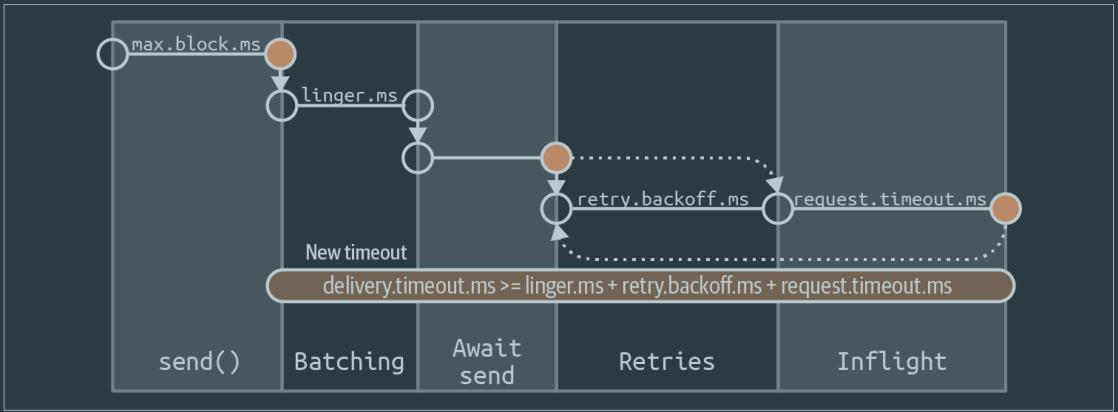
Sequence diagram of delivery time breakdown inside Kafka producer
Producer - Config reference
Producer - Message Delivery Guarantees
Producer - Message Compression
- IBM Developer - Message compression in Apache Kafka (opens in a new tab)
- Cloudflare - Squeezing the firehose: getting the most from Kafka compression (opens in a new tab)
Producer - Record Headers
-
Design
public interface Header { String key(); byte[] value(); } -
Use cases
- Automated routing of messages based on header information between clusters
- Enterprise APM tools (e.g., Appdynamics or Dynatrace) need to stitch in “magic” transaction IDs for them to provide end-to-end transaction flow monitoring.
- Audit metadata is recorded with the message, for example, the client-id that produced the record.
- Business payload needs to be encrypted end to end and signed without tamper, but ecosystem components need access to metadata to achieve tasks.
Producer - Cheatsheet
Producer - Produce messages with CLI
-
CLI
kafka-console-producerkafka-avro-console-producerkafka-json-schema-console-producerkafka-protobuf-console-producer
-
Use one of the above CLI to produce messages. The topic will be created automatically if
auto.create.topics.enable=true.kafka-protobuf-console-producer \ --bootstrap-server ${BOOTSTRAP_SERVER} \ --property schema.registry.url=${SCHEMA_REGISTRY_URL} \ --topic t1-p \ --property parse.key=true \ --property key.schema.id=$SCHEMA_ID \ --property value.schema='syntax = "proto3"; message MyRecord { string f1 = 1; }' -
You will be prompted with
stdinto input the message payloadInput messages as many as you want, press ENTER after inputting each message to send it, and switch to a new line to type a new message. To quit, use
Ctrl + C.{ "f1": "value1-p" }An alternative is to use a file for message input.
kafka-protobuf-console-producer \ --bootstrap-server ${BOOTSTRAP_SERVER} \ --property schema.registry.url=${SCHEMA_REGISTRY_URL} \ --topic t1-p \ --property value.schema='syntax = "proto3"; message MyRecord { string f1 = 1; }' \ < topic-input.txt -
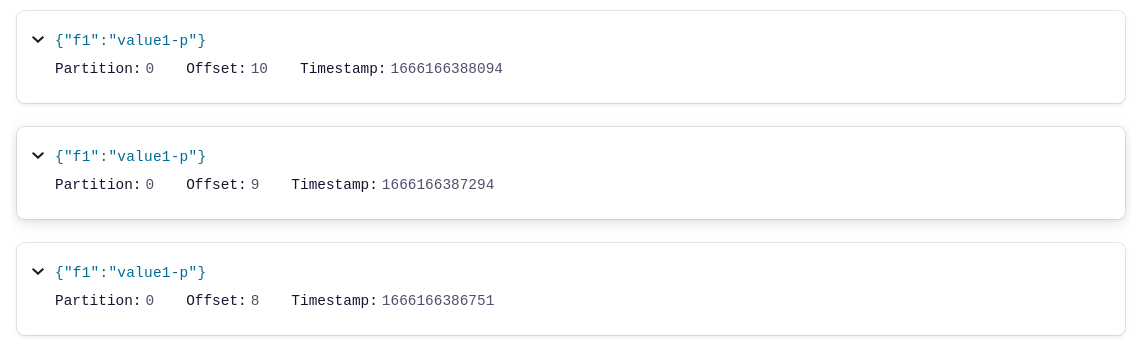
Each message will be sent to broker and can be seen in Control Center - Topics view.
Consumer
- Number of consumers in a consumer group shouldn't exceed the number of partitions in the topic, because each partition has a consumer assigned to it.
- At the heart of the Consumer API is a simple loop for polling the server for more data.
Consumer - Config reference
Consumer - Metrics
| Micrometer Metric | What It Tells You | Warning Signs |
|---|---|---|
| kafka.consumer.fetch.manager.records.lag | Number of messages consumer is behind | Steady increase over time |
| kafka.consumer.fetch.manager.records.lag.max | Maximum lag across all partitions | Spikes during peak hours |
| kafka.consumer.fetch.manager.records.consumed.rate | Consumption throughput | Drops during lag increases |
| kafka.consumer.fetch.manager.bytes.consumed.rate | Data volume throughput | Lower than producer rate |
| kafka.consumer.fetch.manager.fetch.rate | How often consumer polls | Stalls or inconsistency |
Kafka Admin
Kafka Connect
-
Resources
-
Confluent Docs - Connect REST Interface (opens in a new tab)
-
Confluent blog - Easy Ways to Generate Test Data in Kafka (opens in a new tab)
Use
Kafka Connect Datagen Connectorto generate test data
-
Kafka Connect - Config reference
Kafka Connect - Datagen Source Connector to generate mock data
- Datagen Source Connector for Confluent Platform (opens in a new tab)
- How to generate mock data to a Kafka topic using the Datagen Source Connector (opens in a new tab)
Kafka Connect - Cheatsheet
Kafka Connect - Get worker cluster ID, version, and git source code commit ID
curl ${KAFKA_CONNECT_HOST}:8083/ | jqKafka Connect - List the connector plugins available on a worker
-
Connector plugins are JARs deployed to Kafka Connect, inactive but available to be used.
curl ${KAFKA_CONNECT_HOST}:8083/connector-plugins | jq
Kafka Connect - List active connectors on a worker
-
Connectors are connector plugins that are currently running.
curl ${KAFKA_CONNECT_HOST}:8083/connectors | jq
REST Proxy
Authentication
- REST Proxy default admin credentials:
admin/admin_pw
Observability
Observability - JMX
Testing
-
GitHub - Kafka Datasource for Grafana (opens in a new tab)
A Grafana datasource plugin for Apache Kafka
Resources
-
Kafka, Kafka Streams and Kafka Connect: What’s the difference? (opens in a new tab)
-
Confluent Docs - Supported Versions and Interoperability (opens in a new tab)
Confluent Platform and Apache Kafka compatibility matrix
-
IBM Developer - Apache Kafka - Resources and Tools (opens in a new tab)
Great collection of articles and resources
Resources - Examples
- GitHub - confluentinc/cp-demo (opens in a new tab)
- GitHub - confluentinc/examples (opens in a new tab)
Resources - Visualization
Interview
Interview Questions
-
Resources
-
How to implement deduplication of messages?
-
How to ensure ordered message delivery?
Produce messages to the same partition
Demo
-
Spring for Apache Kafka the advanced features by Tim van Baarsen & Kosta Chuturkov @ Spring I/O 25